Core Web Vitals: what they are and why they matter
Many SME owners come across Core Web Vitals by chance, pasting their website address into PageSpeed Insights after reading somewhere that "Google looks at speed too". The score that appears, often red or orange, causes more confusion than clarity: what do those abbreviations actually mean, and how worried should you be?
What they actually measure
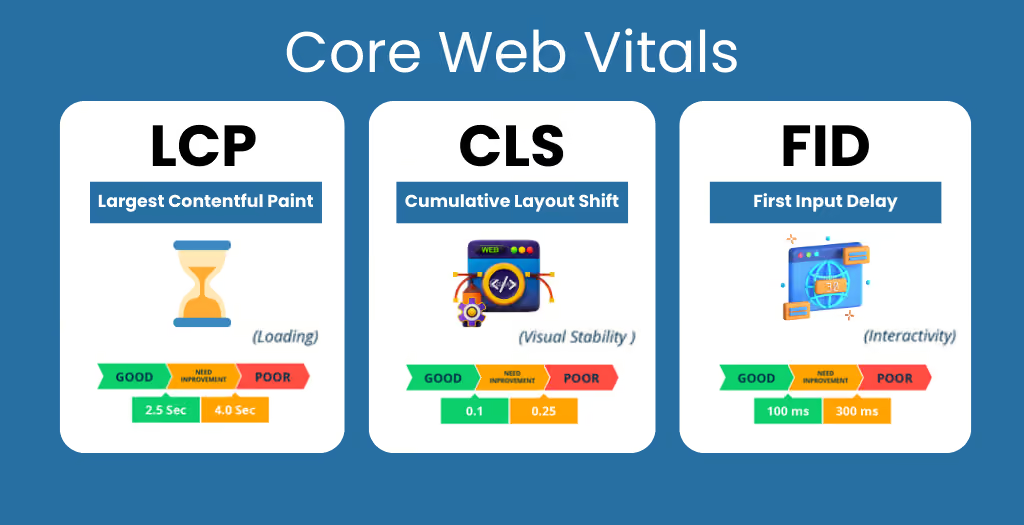
Core Web Vitals are three metrics Google uses to assess the real experience of people visiting a page, measured on actual users rather than in a lab.
LCP: how long you wait to see something
Largest Contentful Paint measures how long it takes for the main element of the page, usually an image or a block of text, to become visible. A slow LCP means that people opening the site stare at a blank or half-built screen for too long before they can start reading.
INP: how quickly it responds
Interaction to Next Paint measures the time between a user action, such as a click on a button or a menu, and the page’s visible response. If this time is high, the site seems frozen or slow to react, even when it is simply processing something in the background.
CLS: how much the page moves while it loads
Cumulative Layout Shift measures how much the elements on the page move around while loading is still under way. It is the annoyance everyone knows: you try to click a link and end up tapping an advert because the page rearranged itself a split second earlier.
Why Google takes them into account for ranking
Google uses Core Web Vitals as one of many signals for judging the quality of a page. They are not the only factor, and a site with weak content will not climb the rankings just by improving these three numbers. They are still a concrete signal, though: a slow or unstable site offers a worse experience, and Google tries to reward pages that do not waste their visitors’ time or patience.
We also covered this in the article why your website does not appear on Google, where technical performance is listed among the factors that can limit a site’s visibility, alongside structure and content.
Why they matter even if you forget about Google
Even leaving rankings aside, these numbers tell you something very practical: how pleasant, or frustrating, your site is to use. A slow LCP loses visitors before they have read a single word. A high CLS leads to wrong clicks, forms filled in by mistake and a general impression of a careless website. A slow INP makes a site look frozen when it may just be processing a request in the background.
These problems weigh even more on smartphones, where connections are often slower and mistaken taps more frequent: we looked at this in detail in the article mobile first: why your website has to work on smartphones first. And if the site is an online shop, an unstable CLS right at the payment stage can make someone abandon a purchase they had almost completed, a problem we discuss in the article an overcomplicated checkout: how many customers could you lose?
How to see your site’s numbers
The simplest way to check is to paste your site’s address into PageSpeed Insights, Google’s free tool, which gives a score for desktop and for mobile, along with the measured value of each Core Web Vital. It is worth looking at the two scores separately, because the mobile version often turns out slower than the desktop one, sometimes by a wide margin.
The most common causes of a low score are heavy, unoptimised images, underperforming hosting, too much JavaScript loaded straight away instead of when it is actually needed, and fonts or advertising elements that load late and shift the page layout.
You do not need a perfect score
A common mistake, once you have discovered these numbers, is to become obsessed with reaching a perfect score. For most company websites that is neither realistic nor necessary. What matters is staying within a reasonable range, avoiding the most critical values that point to a real problem for visitors, and checking from time to time that new features or content added over the months have not made things worse.
We look after this technical side directly through our Hosting and IT support service, choosing suitable hosting and working on images and code when targeted fixes are needed.
If you have never checked your site’s Core Web Vitals, or you have seen a low score and do not know where to start, get in touch: we will tell you plainly what is really slowing your site down and what is worth fixing.